
Synthetic Pumping Test - Introduction#
Introduction#
What is timflow.transient?#
timflow.transient uses the Laplace Transform Analytic Element Method (AEM) to derive a solution to transient flow in multi-layered systems. timflow uses discrete features such as Wells and Line-elements to represent real-world aquifer features of interest.
In this notebook we demonstrate:
How to specify a simple conceptual model consisting of one confining layer and one well
Simulate the model
Calibrate aquifer parameters by providing data from observation wells
To achieve this we will create a Model, sample some observations add noise and try to find the model parameters through fitting
We begin by importing the required libraries
Step 1: Import the Required Libraries#
import matplotlib.pyplot as plt  # Plotting library
import numpy as np  # Numpy

from timflow import transient as tft

plt.rcParams["figure.figsize"] = (6, 4)
Step 2: Set Model Parameters#
We set the model parameters with dimensions in meters and time in days
H = 7  # aquifer thickness [m]
k = 70  # hydraulic conductivity [m/d]
S = 1e-4  # specific storage fo the aquifer
Q = 788  # constant discharge [m/d]
d1 = 30  # distance of observation well 1 to pumpinq well
d2 = 90  # distance of observation well 2 to pumpinq well (same as Oude Korendijk)
Step 3: Loading Data:#
Since we are modelling a synthetic example. We will just borrow the time interval from another pumping test
Data consistis of two columns:
First column is time in minutes
Second column is the piezometer level in meters above mean sea level [amsl]
data1 = np.loadtxt("../04pumpingtests/data/piezometer_h30.txt", skiprows=1)
t = data1[:, 0] / 60 / 24  # convert min to days
As seen above, we have loaded the data as a numpy array. That is the preffered format for loading data into timflow.
Step 4: Creating a Conceptual Model#
We will model our aquifer using ModelMaq, which is the 2d model interface from
timflow.transient. It assumes horizontal stacking of layers consiting of one aquifer
and a leaky aquitard.
ml = tft.ModelMaq(
    kaq=k,  # Hydraulic Conductivity of the aquifer
    # Top and bottom dimensions of the aquifer layer.
    # The leaky aquitard can have 0 thickness:
    z=[-18, -25],
    Saq=1e-4,  # Specific storage of the aquifers
    # the minimum time for which heads can be computed after any change
    # in boundary condition:
    tmin=1e-5,
    tmax=1,  # The maximum time for which heads will be computed
)
Now we add the Well element at position (0,0) with screen radius of 10 cm
w = tft.Well(
    ml,  # Model where we add the well element
    xw=0,  # Position x
    yw=0,  # Position y
    rw=0.1,  # Well radius,
    tsandQ=[(0, 788)],  # Tuple describing starting time and discharge
)
We can now ‘solve’ the model and compute the heads at the two observation locations
ml.solve(silent="False")
# To compute the heads at the specified time intervals and location, we use the 'head'
# method
h1 = ml.head(
    x=d1,  # location of observation well 1
    y=0,
    t=t,  # Time array that the heads will be returned for
)
h2 = ml.head(
    x=d2, y=0, t=t
)  # Computing heads at distance d2, and time array t for observation well 2
# We can take a look at the data:
h1
array([[-2.28275005e-04, -7.70478495e-03, -3.18554789e-02,
        -5.15317124e-02, -7.77470940e-02, -1.06832914e-01,
        -1.36233673e-01, -1.57179785e-01, -1.76793144e-01,
        -1.96853417e-01, -2.16516483e-01, -2.50176995e-01,
        -2.78596120e-01, -3.02578736e-01, -3.08282745e-01,
        -3.25241029e-01, -3.58423647e-01, -3.97875559e-01,
        -4.48679374e-01, -4.73964011e-01, -5.01394438e-01,
        -5.21357146e-01, -5.47533636e-01, -5.86237506e-01,
        -6.08113174e-01, -6.56622524e-01, -6.90311058e-01,
        -7.28971841e-01, -7.54845223e-01, -7.78144650e-01,
        -8.14919239e-01, -8.43451038e-01, -8.68180109e-01,
        -8.84950599e-01]])
The head method output a numpy array with dimensions [number of aquifer layers, number of time data]. In this case we only have one row
Step 5: Demonstration of Calibration with timflow#
To demonstrate the capability of timflow for deriving aquifer parameters with drawdown data, we will first add noise to the sampled data. We will test the model performance with two standard devitations: 0.02 and 0.05
# np.savetxt('data/syn_30_0.0.txt', h1[0])
# np.savetxt('data/syn_90_0.0.txt', h2[0])
# print(h2[0])
Creating the arrays with noise for sigma = 0.02
rnd = np.random.default_rng(5)  # Adding a Random seed
he12 = h1[0] - rnd.random(len(t)) * 0.02
he22 = h2[0] - rnd.random(len(t)) * 0.02
np.savetxt("data/syn_p30_0.02.txt", he12)
np.savetxt("data/syn_p90_0.02.txt", he22)
Creating the arrays with noise for sigma = 0.05
rnd = np.random.default_rng(4)  # Adding a Random seed
he15 = h1[0] - rnd.random(len(t)) * 0.05
he25 = h2[0] - rnd.random(len(t)) * 0.05
np.savetxt("data/syn_p30_0.05.txt", he15)
np.savetxt("data/syn_p90_0.05.txt", he25)
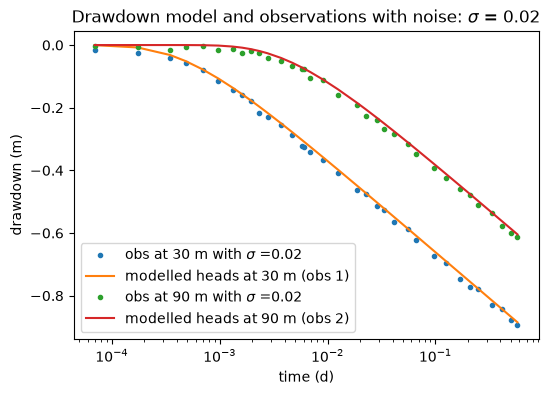
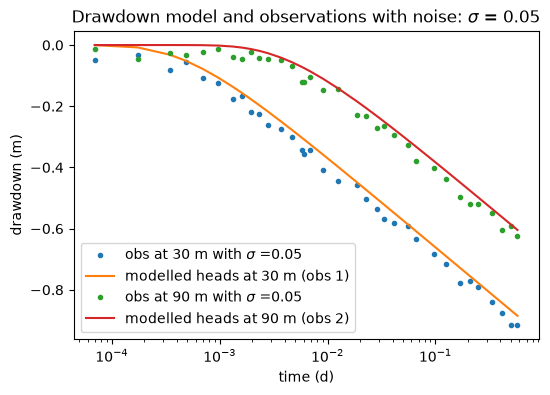
Plotting and checking the noise added data:
plt.semilogx(t, he12, ".", label="obs at 30 m with $\sigma$ =0.02")
plt.semilogx(t, h1[0], label="modelled heads at 30 m (obs 1)")
plt.semilogx(t, he22, ".", label="obs at 90 m with $\sigma$ =0.02")
plt.semilogx(t, h2[0], label="modelled heads at 90 m (obs 2)")
plt.legend()
plt.xlabel("time (d)")
plt.ylabel("drawdown (m)")
plt.title("Drawdown model and observations with noise: $\sigma$ = 0.02");
plt.semilogx(t, he15, ".", label="obs at 30 m with $\sigma$ =0.05")
plt.semilogx(t, h1[0], label="modelled heads at 30 m (obs 1)")
plt.semilogx(t, he25, ".", label="obs at 90 m with $\sigma$ =0.05")
plt.semilogx(t, h2[0], label="modelled heads at 90 m (obs 2)")
plt.legend()
plt.xlabel("time (d)")
plt.ylabel("drawdown (m)")
plt.title("Drawdown model and observations with noise: $\sigma$ = 0.05");
Step 5.1: Calibration of the model using the noisy data#
Calibrate the model using the \(\sigma \) = 0.02 noisy data from observation well 1.
We calibrate the model by creating a
Calibrateobject with the initial model as input.Then we set the parameter initial values using the
set_parametermethodwe add the observation data with the
seriesmethodAnd fit
ca23 = tft.Calibrate(ml)  # class for model calibration
# Setting initial parameters values for calibration
ca23.set_parameter(name="kaq", initial=10, layers=0)  # Hydraulic Conductivity
ca23.set_parameter(name="Saq", initial=1e-3, layers=0)  # Specific Storage

ca23.series(  # Adding the observations for calibration
    name="obs1",  # Observation well 1
    x=d1,  # Location
    y=0,
    t=t,  # Time Array
    h=he12,  # Drawdown noisy data for well 1
    layer=0,  # Aquifer layer where we have the observations from
)
ca23.fit(report=True)
.................
.................
Fit succeeded.
[[Fit Statistics]]
    # fitting method   = leastsq
    # function evals   = 31
    # data points      = 34
    # variables        = 2
    chi-square         = 0.00167385
    reduced chi-square = 5.2308e-05
    Akaike info crit   = -333.245654
    Bayesian info crit = -330.192933
[[Variables]]
    kaq_0_0:  70.2681131 (init = 10)
    Saq_0_0:  9.0980e-05 (init = 0.001)
We can already see the results from the calibration if we set report = True in the fit method. Besides fit statistics, we also get the Variables, with confidence interval and the correlations between variables during fitting process. Note that these confidence intervals can be estimated reasonably well here because the errors are random and uncorrelated, which is generally not the case for pumping tests.
We can also check the calibrated parameters:
ca23.parameters
| layers | optimal | pmin | pmax | initial | inhoms | parray | |
|---|---|---|---|---|---|---|---|
| kaq_0_0 | 0 | 70.268113 | -inf | inf | 10.000 | None | [[70.26811312706225]] |
| Saq_0_0 | 0 | 0.000091 | -inf | inf | 0.001 | None | [[9.097954819071687e-05]] |
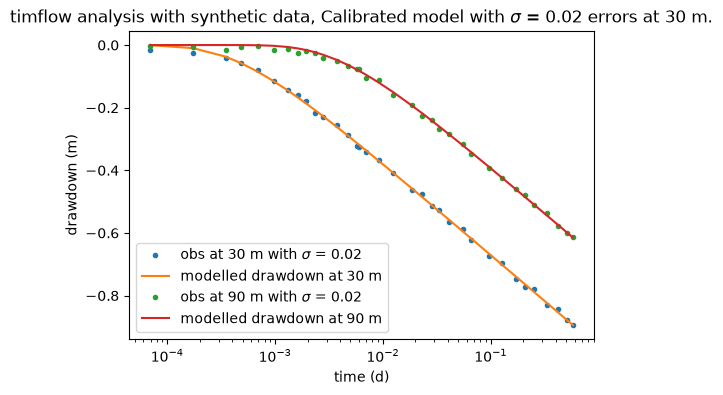
We can now compare the model performance for both observation wells
print("rmse:", ca23.rmse())  # Return the RMSE error for the calibration
h123 = ml.head(d1, 0, t)  # Compute drawdown of the calibrated model for obs 1
h223 = ml.head(d2, 0, t)  # Compute drawdown for obs 2
plt.semilogx(t, he12, ".", label="obs at 30 m with $\sigma$ = 0.02")
plt.semilogx(t, h123[0], label="modelled drawdown at 30 m")
plt.semilogx(t, he22, ".", label="obs at 90 m with $\sigma$ = 0.02")
plt.semilogx(t, h223[0], label="modelled drawdown at 90 m")
plt.xlabel("time (d)")
plt.ylabel("drawdown (m)")
plt.title(
    "timflow analysis with synthetic data, "
    "Calibrated model with $\sigma$ = 0.02 errors at 30 m."
)
plt.legend();
rmse: 0.007016470842538246
Now we do the same procedure as before to calibrate the model, but now using the observation data from well 2:
ca29 = tft.Calibrate(ml)
ca29.set_parameter(name="kaq", initial=10, layers=0)
ca29.set_parameter(name="Saq", initial=1e-3, layers=0)
ca29.series(name="obs2", x=d2, y=0, t=t, h=he22, layer=0)
ca29.fit(report=True)
display(ca29.parameters)
...................
...................
Fit succeeded.
[[Fit Statistics]]
    # fitting method   = leastsq
    # function evals   = 35
    # data points      = 34
    # variables        = 2
    chi-square         = 0.00148507
    reduced chi-square = 4.6408e-05
    Akaike info crit   = -337.314241
    Bayesian info crit = -334.261520
[[Variables]]
    kaq_0_0:  71.2273812 (init = 10)
    Saq_0_0:  8.7833e-05 (init = 0.001)
| layers | optimal | pmin | pmax | initial | inhoms | parray | |
|---|---|---|---|---|---|---|---|
| kaq_0_0 | 0 | 71.227381 | -inf | inf | 10.000 | None | [[71.22738123485956]] |
| Saq_0_0 | 0 | 0.000088 | -inf | inf | 0.001 | None | [[8.783294920877036e-05]] |
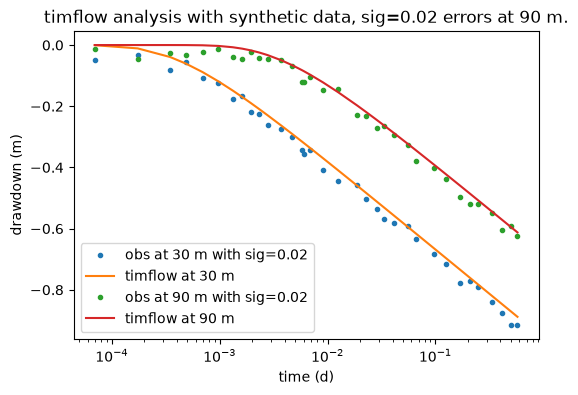
We can once again check the model performance with the new calibrated model
print("rmse:", ca29.rmse())
h129 = ml.head(d1, 0, t)
h229 = ml.head(d2, 0, t)
plt.semilogx(t, he15, ".", label="obs at 30 m with sig=0.02")
plt.semilogx(t, h129[0], label="timflow at 30 m")
plt.semilogx(t, he25, ".", label="obs at 90 m with sig=0.02")
plt.semilogx(t, h229[0], label="timflow at 90 m")
plt.legend()
plt.xlabel("time (d)")
plt.ylabel("drawdown (m)")
plt.title("timflow analysis with synthetic data, sig=0.02 errors at 90 m.")
plt.legend(loc="best");
rmse: 0.006608972592749514
Step 5.2: Calibrate with two datasets simultaneously#
timflow can also analyse the pumping tests using drawdown data from more than one borehole.
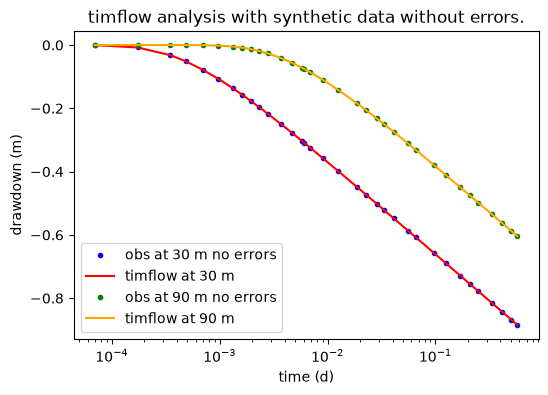
Here we calibrate the model using the data without error from both observation wells.
ca0 = tft.Calibrate(ml)
ca0.set_parameter(name="kaq", initial=10, layers=0)
ca0.set_parameter(name="Saq", initial=1e-3, layers=0)
ca0.series(name="obs1", x=d1, y=0, t=t, h=h1[0], layer=0)
ca0.series(name="obs2", x=d2, y=0, t=t, h=h2[0], layer=0)
ca0.fit(report=True)
display(ca0.parameters)
.................
...........
Fit succeeded.
[[Fit Statistics]]
    # fitting method   = leastsq
    # function evals   = 25
    # data points      = 68
    # variables        = 2
    chi-square         = 6.1525e-15
    reduced chi-square = 9.3220e-17
    Akaike info crit   = -2508.01704
    Bayesian info crit = -2503.57803
[[Variables]]
    kaq_0_0:  69.9999998 (init = 10)
    Saq_0_0:  1.0000e-04 (init = 0.001)
| layers | optimal | pmin | pmax | initial | inhoms | parray | |
|---|---|---|---|---|---|---|---|
| kaq_0_0 | 0 | 70.0000 | -inf | inf | 10.000 | None | [[69.99999984487886]] |
| Saq_0_0 | 0 | 0.0001 | -inf | inf | 0.001 | None | [[9.999999841889686e-05]] |
The obtained results match exactly the input parameters
print("rmse:", ca0.rmse())
h1n = ml.head(d1, 0, t)
h2n = ml.head(d2, 0, t)
plt.semilogx(t, h1[0], "b.", label="obs at 30 m no errors")
plt.semilogx(t, h1n[0], color="r", label="timflow at 30 m")
plt.semilogx(t, h2[0], "g.", label="obs at 90 m no errors")
plt.semilogx(t, h2n[0], color="orange", label="timflow at 90 m")
plt.xlabel("time (d)")
plt.ylabel("drawdown (m)")
plt.title("timflow analysis with synthetic data without errors.")
plt.legend();
rmse: 9.511982053602285e-09
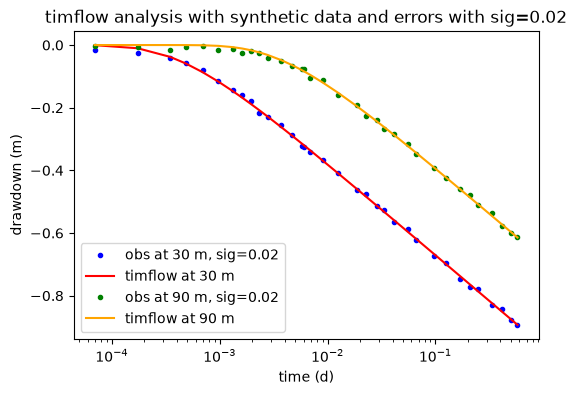
We do the same, but now with drawdowns with errors with \(\sigma=0.02\).
ca2 = tft.Calibrate(ml)
ca2.set_parameter(name="kaq", initial=10, layers=0)
ca2.set_parameter(name="Saq", initial=1e-3, layers=0)
ca2.series(name="obs1", x=d1, y=0, t=t, h=he12, layer=0)
ca2.series(name="obs2", x=d2, y=0, t=t, h=he22, layer=0)
ca2.fit()
display(ca2.parameters)
....................
...........
Fit succeeded.
| layers | optimal | pmin | pmax | initial | inhoms | parray | |
|---|---|---|---|---|---|---|---|
| kaq_0_0 | 0 | 70.532646 | -inf | inf | 10.000 | None | [[70.53264573856877]] |
| Saq_0_0 | 0 | 0.000090 | -inf | inf | 0.001 | None | [[8.977735013823093e-05]] |
print("rmse:", ca2.rmse())
h12 = ml.head(d1, 0, t)
h22 = ml.head(d2, 0, t)
plt.semilogx(t, he12, "b.", label="obs at 30 m, sig=0.02")
plt.semilogx(t, h12[0], color="r", label="timflow at 30 m")
plt.semilogx(t, he22, "g.", label="obs at 90 m, sig=0.02")
plt.semilogx(t, h22[0], color="orange", label="timflow at 90 m")
plt.xlabel("time (d)")
plt.ylabel("drawdown (m)")
plt.title("timflow analysis with synthetic data and errors with sig=0.02")
plt.legend();
rmse: 0.006892063196023654
Drawdowns with errors with \(\sigma=0.05\).
ca5 = tft.Calibrate(ml)
ca5.set_parameter(name="kaq", initial=10, layers=0)
ca5.set_parameter(name="Saq", initial=1e-3, layers=0)
ca5.series(name="obs1", x=d1, y=0, t=t, h=he15, layer=0)
ca5.series(name="obs2", x=d2, y=0, t=t, h=he25, layer=0)
ca5.fit()
display(ca5.parameters)
.................
.................
.
Fit succeeded.
| layers | optimal | pmin | pmax | initial | inhoms | parray | |
|---|---|---|---|---|---|---|---|
| kaq_0_0 | 0 | 71.435313 | -inf | inf | 10.000 | None | [[71.43531335960876]] |
| Saq_0_0 | 0 | 0.000074 | -inf | inf | 0.001 | None | [[7.362191094463454e-05]] |
print("rmse:", ca5.rmse())
h15 = ml.head(d1, 0, t)
h25 = ml.head(d2, 0, t)
plt.semilogx(t, he15, "b.", label="obs at 30 m")
plt.semilogx(t, h15[0], color="r", label="timflow at 30 m")
plt.semilogx(t, he25, "g.", label="obs at 90 m")
plt.semilogx(t, h25[0], color="orange", label="timflow at 90 m")
plt.xlabel("time (d)")
plt.ylabel("drawdown (m)")
plt.title("timflow analysis with synthetic data and errors with sig=0.05")
plt.legend();
rmse: 0.017262548368219357
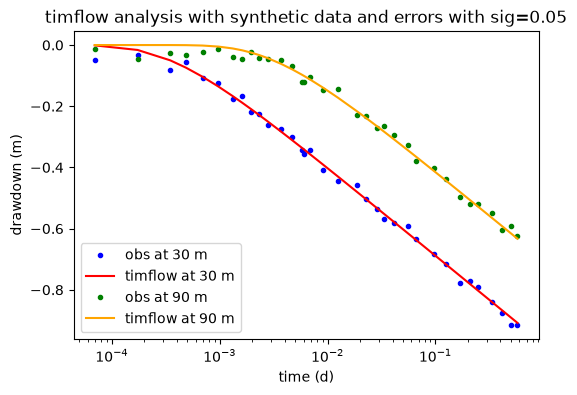
We can see the model also performed well for \(\sigma = 0.05\)
Final Remarks#
In this example we have succesfully:
Initiated a timflow model instance using the
ModelclassSampled observation data from the model and defined the synthetic data by adding noise.
Calibrated the model with the
Calibrateclass using one and two calibration wellsInspected the calibration performance